
Successfully navigating the Indian Armed Forces recruitment process requires more than just technical knowledge. It demands extreme attention to detail. As a Senior Military Career Consultant and Lead Recruitment Analyst at CarrierAdda, I have seen thousands of candidates. Unfortunately, many brilliant engineering graduates are disqualified before they even reach the Service Selection Board (SSB). Most of these rejections stem from preventable errors in the online application.
The “biggest application mistakes” usually involve three specific areas. These are incorrect engineering branch selection, mismatched academic marks, and personal detail errors. These often conflict with your matriculation records. A single typo or a misunderstood eligibility rule does not just delay your career. It leads to immediate disqualification during document verification or at the SSB interview.
This guide provides a professional roadmap for the SSC Tech 68 application. It is designed to help you treat your form as the first test of your officer-like qualities. A successful application begins with a clear understanding of the baseline requirements and the portal’s layout.
SSC Tech 68 Application Form Overview
Before you begin typing, you must view the application as a formal legal declaration. An overview is your first line of defense. Rushing into the portal without knowing the deadlines leads to “form fatigue.” This is exactly when most critical errors occur.
The Indian Armed Forces utilize these technical entries to induct talented men and women into specialized branches. Understanding the official parameters of the current cycle ensures you do not miss critical windows. For this cycle, the dates are specific and non-negotiable.
Official SSC Tech 68 At-A-Glance
| Feature | Details |
| Application Mode | Online Only |
| Official Portal | https://joinindianarmy.nic.in/ |
| Registration Requirement | One-Time Registration (OTR) Mandatory |
| Application Fee | Refer to Notification (Generally No Fee) |
| Start Date | January 24, 2026 |
| Last Date | February 24, 2026 |
| Correction Option | None (No amendments entertained after submission) |
| Application Printout | Mandatory for SSB Interview |
Once you have reviewed these high-level details, the first active step is your digital registration. This must be done on the official recruitment portal.
The SSC Tech Registration Process
The “One-Time Registration” (OTR) is the foundation of your digital profile with the Armed Forces. Accuracy here is non-negotiable. This data often populates subsequent forms automatically. Errors made during registration are almost impossible to fix later.
Follow this 8-step sequence to ensure a clean registration:
- Portal Visit: Access the official “Join Indian Army” or recruitment website.
- Registration Completion: Click on the registration link and enter basic details.
- Account Verification: Verify your email and mobile number via the provided codes.
- Login: Use your new credentials to access the candidate dashboard.
- Application Opening: Locate the “Apply Online” section for the SSC Tech entry.
- Form Completion: Fill in your personal, communication, and educational data.
- Review and Submit: Use the “Preview” function to check every single line.
- Document Saving: Save a digital PDF copy and print a physical version immediately.
Pro-Tips for Registration Success:
- Step 1 Pro-Tip: Ensure your internet connection is stable to avoid session timeouts.
- Step 2 Pro-Tip: Your name and date of birth must match your Matriculation (Class 10) Certificate exactly.
- Step 3 Pro-Tip: Use a permanent email address because all call-up letters are sent there.
- Step 4 Pro-Tip: Do not share your login credentials; duplicate registrations lead to permanent banning.
- Step 5 Pro-Tip: Ensure you select the correct entry (SSC Tech) and not a different commission.
- Step 6 Pro-Tip: Keep your marksheets next to you to avoid “memory-based” entry errors.
- Step 7 Pro-Tip: Read every declaration out loud before you click the “I Agree” button.
- Step 8 Pro-Tip: The printed application is a required document at the SSB; do not lose it.
Transitioning from registration, you must now handle the detailed mechanics of the form-filling process. This is where the data becomes more complex.
How to Fill the SSC Tech 68 Application Form
This section is where many candidates struggle. “Form fatigue” sets in when you enter multiple semesters of engineering marks. To maintain accuracy, you should break the process into manageable blocks.
- Personal & Contact Details: This includes your parents’ names and permanent address. Ensure the contact number provided is active for SMS notifications.
- Educational Background: You must provide details for Class 10 and Class 12. This includes the board name, year of passing, and the marks obtained.
- Engineering Degree & Stream Details: You must select your specific engineering branch. Your degree titles must match the official notification streams exactly.
- Final-Year Status: If you are in your final year, you must produce proof of completion by December 20, 2026.
- Required Declarations: You will verify that you meet the nationality and marital status requirements. You must also declare any previous SSB attempts.
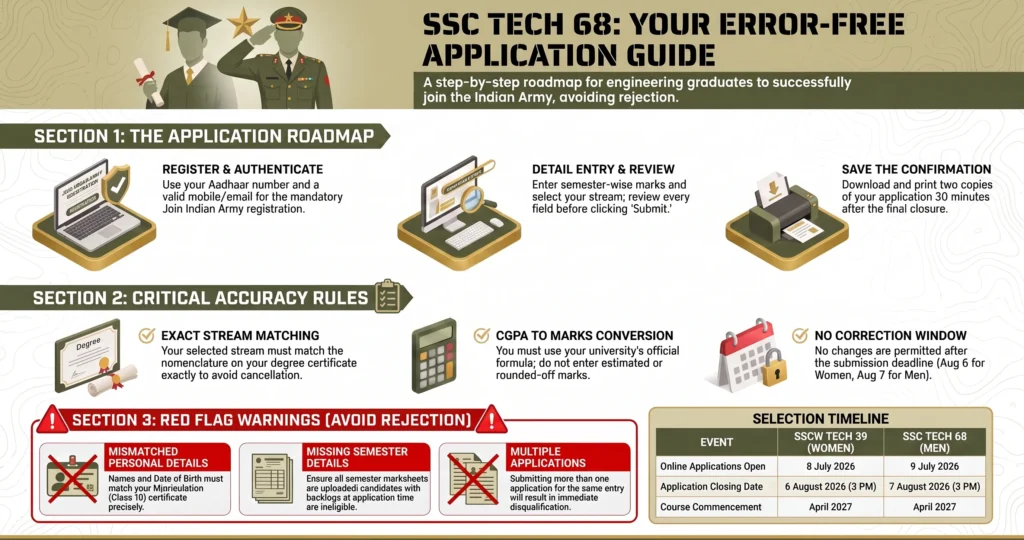
Mandatory Rule: You must never mention “estimated” marks. If your final semester results are not out, you only enter the marks for the semesters you have completed. For BE/B.Tech candidates, marks up to the fifth semester are considered for shortlisting. Entering “projected” marks will lead to disqualification.
The most critical technical hurdle in this process is selecting the correct engineering stream. This requires a deep look at the equivalency rules.
Download Official Notification SSC Technical Officers (Men)
Download Official Notification SSC Technical Officers (Women)
Critical Guidance: SSC Tech Engineering Stream Selection
Stream selection is often the “make or break” point of the application. Many candidates make the fatal error of selecting a branch simply because it has high vacancies. They do this even if their degree is not eligible for that specific branch.
Selection Protocol:
- Identify Your Degree: Look at the exact nomenclature on your degree or provisional certificate.
- Consult the Equivalent List: The official notification provides a list of “Equivalent Streams” for each major branch.
- Verify Eligibility: For example, “Applied Electronics and Communication” often falls under the “Electrical Branch.”
- Men-Only Streams: Be aware that “Mechatronics” and “Automobiles Engineering” are often reserved for men in specific cycles.
- Selection: Only select the branch if your specific degree title is listed under that umbrella.
Selecting a branch based on “Vacancy vs. Eligibility” is a dangerous gamble. Even if you are shortlisted for the SSB, you will be rejected during document verification. At CarrierAdda, we advise students to stick strictly to their eligible branch. For instance, “Power Electronics” is specifically under the Electrical Branch, and “Industrial Engineering” is under the Engineering Branch.
Once the stream is selected, you must focus on the numerical accuracy of your academic performance.
Calculating and Entering Engineering Marks
The “Aggregate Percentage” and CGPA you enter carry significant legal weight. The Armed Forces use these numbers to shortlist candidates for the SSB interview. If there is a discrepancy between your entry and your physical marksheets, you will be barred from the interview.
The Entry Process:
- Semester-Wise Entry: You are required to enter marks for every semester completed so far.
- The 5th Semester Rule: For BE/B.Tech candidates, the shortlisting is typically based on normalized marks up to the 5th semester.
- CGPA Conversion: If your university uses a CGPA system, you must convert this to a percentage. You must use the specific conversion formula provided by your university.
- Evidence of Formula: You must produce the official university document explaining this formula during your SSB interview.
Mandate: Do not enter “estimated” or “rounded-up” marks. You must only enter the actual marks earned as per your official transcripts. For Post-Graduate degrees, all semesters are usually considered. For final-year PG students, performance up to the pre-final year is used.
To ensure these numbers are backed by evidence, you must have your documents ready before you open the portal.
Apply for Indian Army SSC Technical Officers
Documents and Details Needed Before Applying
“Pre-Application Readiness” is the best way to prevent session timeouts. Having everything scanned and ready allows you to focus entirely on data accuracy. It prevents the rushed errors that lead to rejection.
Application Readiness Checklist
Academic Documents
- [ ] Class 10 Marksheet & Passing Certificate (for Date of Birth proof).
- [ ] Class 12 Marksheet & Passing Certificate.
- [ ] All Engineering Semester Marksheets (Up to 5th semester for B.Tech).
- [ ] Provisional or Original Degree Certificate (if completed).
Identity & Communication
- [ ] Valid and active Email ID and Mobile Number.
- [ ] Identity Proof (Aadhar Card).
- [ ] NCC ‘C’ Certificate (if applicable).
Technical Data
- [ ] Official University CGPA to Percentage conversion formula.
- [ ] Scanned Passport-size color photograph (JPG format, clear and legible).
- [ ] Scanned Signature (JPG format).
Strict Forbidding: Do not confuse these online application requirements with the physical documents required at the SSB interview. While the online form requires digital data and some scans, the SSB will require multiple sets of original hard copies. If any document is illegible or blurry, your application will be rejected immediately.
Preparation is designed to avoid the common pitfalls that disqualify hundreds of applicants every year.
The Top Common SSC Tech Application Mistakes
Identifying patterns of failure is the best way to ensure your own success. Most rejections are not due to a lack of merit. They are caused by a lack of care during the form-filling process.
| Mistake | Impact / Consequence |
| Duplicate Registration | Immediate rejection and potential permanent ban. |
| Wrong Stream Selection | Permanent rejection at the document verification stage. |
| Mismatched Date of Birth | Considered falsification of records; immediate rejection. |
| Incorrect Marks Conversion | Shortlisting becomes invalid; barred from SSB interview. |
| Illegible Uploads | Application rejected as verification is impossible. |
Understanding the finality of your submission is vital. You cannot treat this like a practice run.
SSC Tech Application Correction: What You Need To Know
In the Indian Armed Forces recruitment ecosystem, the “Submit” button is final. The policy is very clear. Once you click submit, “no requests for amendments will be entertained.” There is no secondary correction window.
Once you submit your application, the data is locked into the system for shortlisting. Do not rely on the possibility of a “correction window.” If you discover a critical error after submission, your application is likely compromised. It is far better to spend an extra hour reviewing the form than to lose a six-month cycle to a typo.
This leads to the most important part of the process: the final review.
Pre-Submission: The Final Review Checklist
Before you click the final “Submit” button, perform a “Double-Blind Review.” This means checking your data as if you were an auditor looking for a reason to reject the form.
- Name & DOB: Does it match your Class 10 certificate letter-for-letter?
- Marks: Have you checked every semester against the original marksheets?
- Stream: Is your selected branch exactly what is allowed for your specific degree?
- Category: Have you selected the correct gender and category?
- Contact Info: Are your email and phone number typed correctly for communications?
- Proof of Degree: Can you provide the final degree certificate before December 20, 2026?
Frequently Asked Questions (FAQs)
1. What are the step-by-step instructions for filling the SSC Tech form? First, register on the official portal with your matriculation details. Then, log in, select the SSC Tech entry, and enter your academic data. Ensure you upload clear scans of your photograph and signature before the final review.
2. Can I edit my SSC Tech application after I have submitted it? No. Once submitted, the application is final. No amendments or changes are allowed by the recruitment directorate.
3. How do I know which engineering stream to select? You must match your degree nomenclature to the “Equivalent Stream” list in the notification. For example, Applied Electronics and Communication candidates must select the Electrical Branch umbrella.
4. How should I convert my CGPA into a percentage? You must strictly follow the conversion formula provided by your own university. Do not use a generic formula unless specifically instructed by the notification.
5. I am in my final year and haven’t received my final marks. What should I do? You must only enter the marks for the semesters you have completed. For B.Tech, this is usually up to the 5th semester. You must complete all requirements and provide proof by December 20, 2026.
6. What happens if I have a backlog during the SSB? Candidates with any pending backlogs at the time of document verification at the SSB will be barred from the interview. Ensure all previous semesters are cleared before applying.
Conclusion
Filling out the SSC Tech 68 application form is the first step in a prestigious journey. By avoiding common SSC Tech application mistakes and ensuring your SSC Tech engineering stream selection is accurate, you prove your potential. At CarrierAdda, we believe that an error-free form is the first sign of an officer.
The stakes are incredibly high. Successful candidates join the Officers Training Academy (OTA) for a rigorous 49-week training program. Upon commissioning, you start as a Lieutenant or Sub Lieutenant. The initial gross salary is approximately Rs. 1,25,000/- per month, including allowances. This is a career defined by honor, specialized growth, and a high pay scale. Take the extra 10 minutes to review your form today. Those 10 minutes could secure your future in the Indian Armed Forces.